Ben Lane Hodson
Writer, comic book creator, filmmaker, & musician
  • About
  • Books
  • Contact
  • Media Kit

Tales of the Macabre West Update – Beta Readers

June 5, 2014 By Ben Lane Hodson in Books, Tales of the Macabre West

Tales of the Macabre West Update – Beta Readers

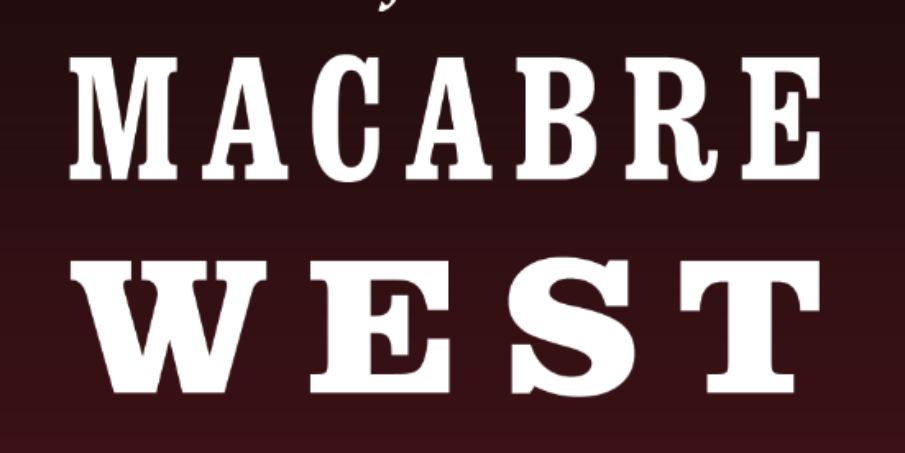
I now have a draft of Tales of the Macabre West that is ready for Beta Readers to read and provide feedback on. I’m about a month behind where I had originally set my goal to have the book in the hands of early readers but that’s alright because during the process of revising and editing, I was able to rework some parts of the stories with new plot twists and ideas that I like even more than the earlier drafts.

How the book is shaping up

The book is clocking in at about 88,000 words (roughly 240 pages). Originally, I had planned to include seven stories but once I dug in on editing, some of the stories were combined while others ended up not being as strong. In the end, I decided to go with these five stories because they are my favorites from this round. Depending on how the book is received, I’m already thinking about a sequel: More Tales of the Macabre West because I have about 8 more great story ideas that I would love to work on for a follow-up.

Interested in Beta Reading?

I have a good-sized list of Beta Readers already digging in but if you’re interested in being an early Beta Reader as well, there’s still time. I need to have your feedback by the deadline of July 1st. You can either comment below that you are interested along with an email address I can contact you at or you can use my Contact Form here. If you aren’t sure what a Beta Reader is, check out this post: 8 Tips on Being an Effective Beta Reader.

But when will it be published?

The deadline for Beta Reader feedback is July 1st. Depending on the feedback I receive from these early readers, the length of time to incorporate their suggestions and fix the issues they point at can vary but the goal right now is to have a printable version, ready to publish sometime in August so it’s in the home stretch!
Revisiting the Star Wars Prequels – The Phantom Menace

May 29, 2014 By Ben Lane Hodson in Movies

Revisiting the Star Wars Prequels – The Phantom Menace

With filming on Star Wars Episode VII underway, it seemed like a good time to revisit the Star Wars prequels. I thought it would be fun to do a “live blog” as I watched each film with thoughts, impressions, and some analysis. So here we go with Star Wars Episode I: The Phantom Menace:

The first scene really has a mysterious feel that fits really well with “the phantom” title but what’s up with the weird kid-looking man/woman that is the captain of Qui-Gon’s ship? The film also looks great. George does a great job showing how far the technology has come since Return of the Jedi.

The trade dispute at the very beginning is an interesting way to show the mundane world of the Jedi. It isn’t adventurous or glamorous to manage trade relations but it definitely seems like something the Jedi’s would do.

I cringed when Obi-Wan said “I have a bad feeling about this.” Why use a line that was traditionally said by other characters and never once spoken by Obi-Wan through the entire original trilogy? It felt awkward and out of place.

Qui-Gon shows his compassion with Jar-Jar by saving him. It’s a good little character moment that makes us as an audience immediately like him.

Robot’s dialogue kills the tension of the first scene. Why did they have to talk like they were mentally deficient? Why not make them a bigger threat so it feels like the Jedi are really being challenged?

Jar-Jar’s introduction truly announces that this isn’t your father’s Star Wars. “Ex-squeeze me”. The possibility that this guy would become a senator strains all credibility.

“How rude” when Jar Jar is poked kills me. No reason to recycle old dialogue from the previous trilogy especially when it was said by a completely different character (C-3PO)

Noble gesture by Qui-gon to save Jar Jar.

Jar Jar feels more like a technical experiment than a legitimately useful character to the story. He exists to show that George could make a character out of complete CG (a HUGE advance for the time) and for comic relief. Frankly, he has more in common with Who Framed Roger Rabbit than Star Wars.

Despite what some may think they remember, the beginning is not boring. The action keeps moving and George continues to throw new things at us every few minutes to keep the pace up.

While I was suffering through another Jar-Jar scene, my daughter was watching next to me and said “ha ha, I love Jar-Jar. He’s my favorite character.” Clearly, George knew what he was doing regardless of my misgivings with the character.

Watto is actually a pretty cool CG character. He looks unique compared to anything we’ve seen in Star Wars before and he’s exceedingly more complex than Jar-Jar.

It was a huge mistake to have Anakin be the creator of C-3PO. There’s no reason for it and it makes the future adventures of C-3PO bizarre and confusing (even with the memory-wipe plot device). It brings new meaning to C-3PO’s exclamation in A New Hope “Thank the Maker!”.

Let me address the Midi-chlorians controversy. I get why George wrote it into the script. He needed an easy expository plot device to tell the audience Anakin was powerful. A MUCH more interesting and clever way to do this would have been to SHOW Anakin do something so amazing with the force that Qui-Gon could say “he is more powerful than Master Yoda.” The Midi-chlorians are a mistake that has haunted the entire Star Wars universe ever since. Taking away the mystical nature of the force and replacing it with simple bio-chemistry was a huge blunder.

The Pod Race really is amazing. Next to the ending sword battle, this is the most exciting and jaw-dropping sequence of this entire film. The stakes are high. Everything just keeps getting worse for Anakin from a slow start, to a mis-aligned engine, to a fire in the turbine, it’s an exciting and edge-of-your-seat race. Great writing here.

Jabba’s introduction at the beginning of the Pod Race is a welcome nod to the original trilogy that doesn’t feel forced or out of place. Also, it’s nice to get a look at Jabba’s wife (isn’t that who the creature next to him is?)

The Tuskan Raiders shooting at the racers was a stroke of comic genius. Well-done on that George. That was genuinely funny and clever to play them like some backwoods rednecks shooting at a Nascar race.

Anakin’s parting from his mother is so overly melodramatic. That scene has not aged well.

The special effects during the landing at Coruscant are breathtaking. Really next generation for the time and still looks quite good.

I always thought the conceptual design and realization of the Imperial Senate was great. It’s functional and well-shot.

The Jedi Council on the other hand is totally mishandled. They come off as power-hungry usurpers that deny their own prophecies. Their questioning of Anakin doesn’t make any sense. Of course, he misses his mother. Their queries are trivialities that have nothing to do with his destiny that they are trying to ascertain. It’s all gibberish masquerading as some deeper meaning.

Practically speaking, the Gungan’s shield design during the Battle of Naboo doesn’t make a lot of sense. It seems a very easy design to defeat with two pack animals having to stay close to each other to generate the shield barrier.

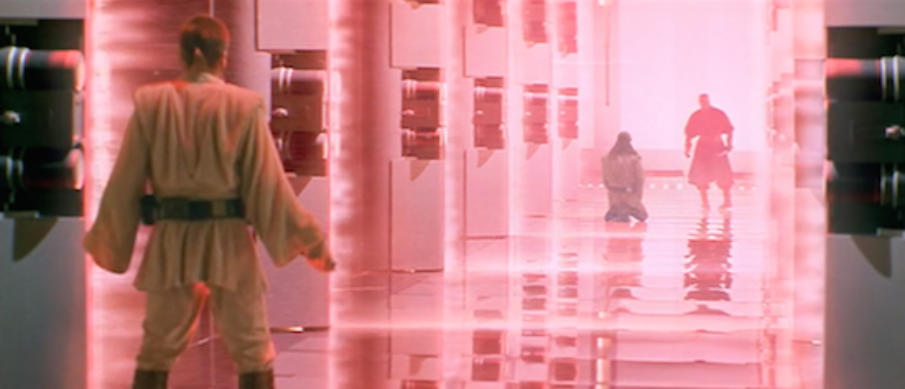
That final sword battle with Darth Maul is truly epic. Still the best of the entire series. It doesn’t hurt that John William’s score makes it 10x more exciting. I do hate that they killed off Darth Maul so soon. He should have been in the next two movies. He had a great set up and then… boom… he’s gone way too soon.

The whole subplot with Anakin (who supposedly knows everything about machines) suddenly not being able to figure out why he is flying the fighter ship and what’s going on is just ridiculous. I understand that it is here to give Anakin something to do but it is so childish, it’s hard for me to really enjoy it. I mean: “Qui Gon said to stay in this cockpit so that’s what I’m going to do.” Come on!

The “triple” battle works well and fits right in with Return of the Jedi’s similar 3-front battle.

My overall feeling is that this episode is the best of the prequels despite its weaknesses. But I’ll withhold a final opinion until I’ve watched the other two again.

Jodorowsky’s Dune and the Power of Vision

May 26, 2014 By Ben Lane Hodson in Movies

Jodorowsky’s Dune and the Power of Vision

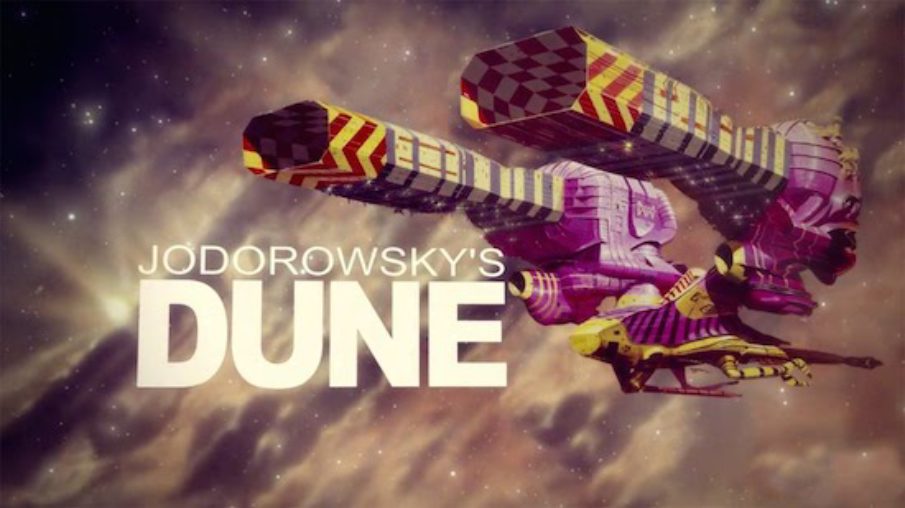
A few weeks back, I watched the documentary Jodorowsky’s Dune. In case you don’t know the basic story, the film recounts director Alejandro Jodorowsky’s attempt to make Frank Herbert’s science fiction masterpiece Dune into a film in the early 1970’s. It isn’t giving anything away to say that Jodorowsky’s film was never made but what’s interesting about this story is how far the film planning got before the studios pulled the plug. This is why many film historian’s call it: “The greatest film never made.”

A Success from Failure

So why make a documentary about a director who failed to get his film made? Besides it being an interesting historical anecdote, the sheer enormity of the plan that Jodorowsky had for the film is staggering. This was a guy with vision like few directors have ever had. The colossal failure of such a gigantic pre-production process really is unique in the history of Hollywood.

What really comes through though is how this failure of a film project spawned so many other projects after. The documentary ends with a series of subsequent films that were heavily influenced by Jodorowsky’s storyboards and concept designs. This film that never was has resonated in hollywood throughout nearly every other science fiction film since.

A Man with a Vision

Above all else, the film really shows the power of an artist with a vision. Jodorowsky assembled some of the biggest names in the movie business, from actors, to storyboard artists, to concept-designers, it is a “who’s who” list of individuals that would go on to be the biggest names in movies in later years.

“The lesson is, someone who truly believes in their art, who is utterly devoted to their project, who has a plan and can articulate that goal from their heart can attract the best. Others will follow that kind of passion.”

Here’s some of the critical attributes Jodorowsky has that allowed him to get such a crazy and overly ambitious project so far along:

Passion – Jodorowsky believed in his film. It was all he thought or talked about when he was preparing it. 100% of his creative energy was channeled towards the film.

Negotiation – There were all kinds of actors, studio executives, and artists that had different ideas about where the film should go and why they wanted to be involved. Jodorowsky was quite clever in negotiating with each person to get them what they really wanted while still getting them to contribute their talents to his vision.

Emotional involvement – Jodorowsky wasn’t just doing a job. He wasn’t just making a fun movie. He truly believed his film would change the world. It had nearly become a pseudo-religion, the concepts, the themes, the power of what he was creating. Everyone else latched onto that belief and wanted to be involved in something bigger than themselves.

The Legacy of Jodorowsky’s Dune

With the recent tragic death of H.R. Giger, the legacy of this film is even more timely. Dan O’Bannon and H.R. Giger met while working on Jodorowsky’s Dune. They formed a creative bond and when the Dune project collapsed, they went on together to a little project called Alien. Dan O’Bannon would go on to write Ridley Scott’s Alien and of course Giger would do some of the most amazing and influential creature/production design in the history of science fiction and horror. The echoes of this “un-film” are still being heard today and all because of one man’s passionate vision.

Annotating from the Web, Mobile, and Desktop

May 25, 2014 By Ben Lane Hodson in Books, Tips & Tricks, Writing

Annotating from the Web, Mobile, and Desktop

There are so many options for eReading today that it can be hard to keep up with all the new features. Now that so much reading happens digitally, it’s useful to know how to create annotations in these various reading applications.

Web

Annotating in Google Docs

Mobile

Annotating in Marvin App

Annotating in iBooks

Annotating in Kindle

Desktop

Annotating in Microsoft Word

Annotating PDF’s in Adobe Acrobat

Annotating in Microsoft Word

May 25, 2014 By Ben Lane Hodson in Books, Tips & Tricks, Writing

Annotating in Microsoft Word

Microsoft Word’s change tracking feature has come to be the standard for annotating documents in most industries including book publishing. MS Word provides advanced annotation capabilities including notes, comments, mark-up, and accept/reject options.

Annotating a Microsoft Word Document

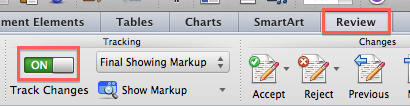
Before you can add annotations, you first need to enable the Track Changes mode in Microsoft Word. Go to the Review tab and toggle the Track Changes mode to on.

word1

Select the text you want to annotate.

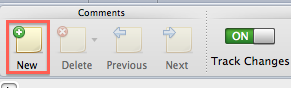
word2

Click the add comment button at the top left to create a new annotation for this selected text.

word3

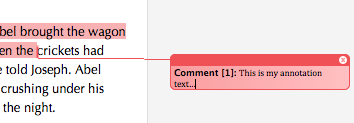
Enter the comment / annotation note into the box that appears to the right of the selected text. The note is immediately saved as you type it.

word4

When you save your Word document, the annotations are automatically saved along with it.

Annotating in Kindle

May 25, 2014 By Ben Lane Hodson in Books, Tips & Tricks, Writing

Annotating in Kindle

Amazon’s Kindle reader (and reading apps) are the most popular eReaders in the world.

One BIG limitation of the Kindle readers currently is that you can only export annotations to books you have purchased through the Amazon store. That means any books you’ve loaded on your Kindle or any of your PDF’s and personal documents cannot have their annotations exported.

Annotating a Kindle Book

Tap and hold the text you want to select. Use the sliders to expand or contract your selection. A menu will appear above the selected text. Click on the pencil/paper icon to enter your annotation note.

kindle1

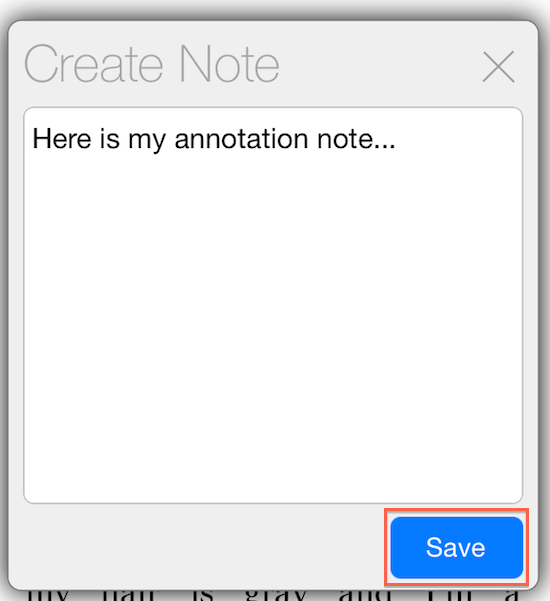
Enter your note text and tap the Save button.

kindle2

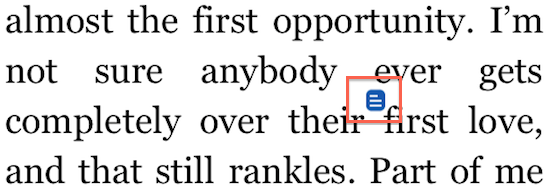
A small icon appears above the text that was selected showing that an annotation was added here.

kindle3

Exporting Annotations

As mentioned above, only annotations made on books you’ve purchased from the Amazon store can be exported.

To access your annotations, login to your Amazon account and go to:

https://kindle.amazon.com/your_highlights

You will see any highlights you’ve made to books you’ve read on your Kindle device (or Kindle app) listed on this page. You can copy and paste them to another document. It isn’t as great as other app’s export options but at least you don’t have to type them again.

Annotating in iBooks

May 25, 2014 By Ben Lane Hodson in Books, Tips & Tricks, Writing

Annotating in iBooks

iBooks is Apple’s eBook reader. It’s available for free on Mac OS X and all iOS devices. You can purchase eBooks from Apple’s iBook store but you can also load your own ePub and PDF books into the app using iTunes.

Annotating a Book in iBooks

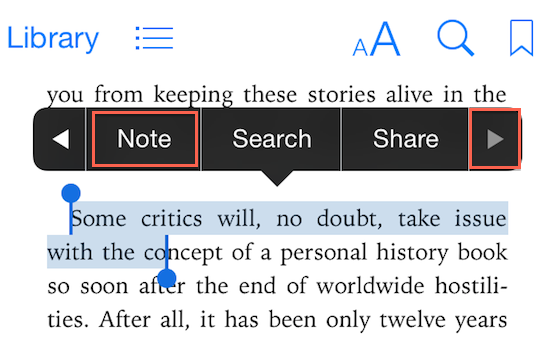
Tap and hold to highlight a section of text you’d like to annotate in the book you’re reading. Using the sliders on the selected text to expand or contract your selection. A menu of options will appear above your highlighted text. Click the right-arrow until you see the Note option.

ibook1

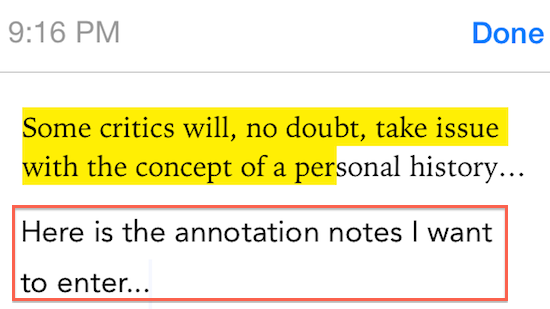
Enter your note below the text you highlighted and click the Done button at the top.

ibook2

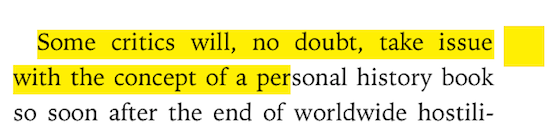
You now see that your selected text stays highlighted and a highlight mark is shown on the right side of the text. You can click this mark to edit your note.

ibook3

Exporting Annotations

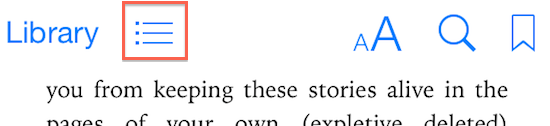
You can export only a few annotations you select or the entire list of all your annotations for a book by first clicking on the chapters icon at the top of iBooks.

ibook4

Tap on the Notes tab to see all the annotations you’ve made on this book.

ibook5

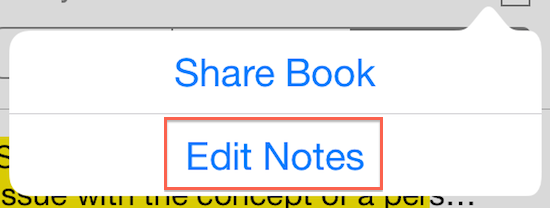
Tap on the options icon and choose Edit Notes so you can select what notes to export.

ibook6

You can either manually check each note you want to export or you can use the Select All option at the bottom to select all your annotations at once.

ibook7

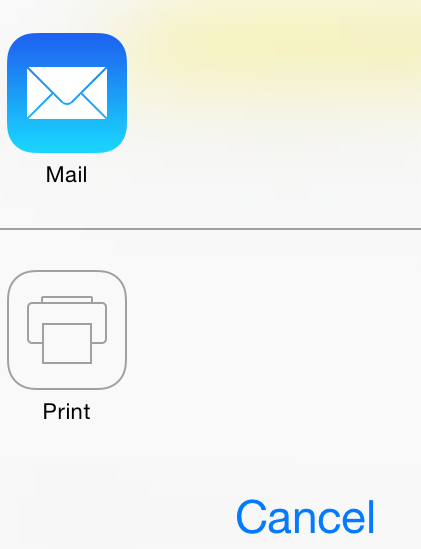
After selecting what annotations to export, click the Share button at the bottom.

ibook8

You can now email or print your annotations.

ibook9

If you email the notes, they are listed inside the email text along with the selected text.


Annotating in Google Docs

May 25, 2014 By Ben Lane Hodson in Books, Tips & Tricks, Writing

Annotating in Google Docs

Google’s free Google Docs online editor is a great option for sharing and annotating documents. Google Docs is also integrated with Google Drive so that your documents are all automatically stored and accessible in the cloud.

Annotating a Google Document

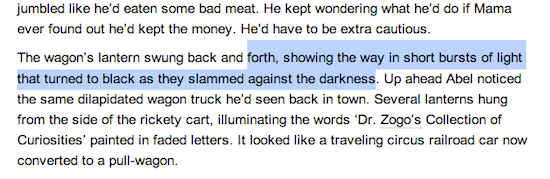
Highlight the text that you want to annotate in your document.

googledocs1

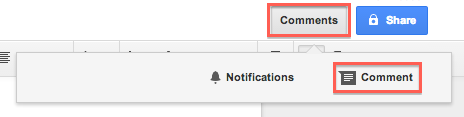
In Google Docs, an annotation is referred to as a “comment.” You can create a comment by either clicking on the Comment button or using the keyboard shortcut CMD + OPT + M (on Mac) or CTRL + ALT + M (on Windows).

googledocs2

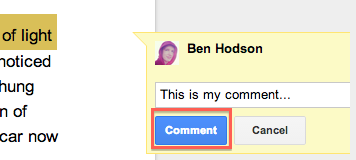
Enter your comment into the box that appears at the right side of the text and click the Comment button to save it.

googledocs3

Because Google Docs is a collaborative, cloud-based servie, it also provides a way to reply to a comment and resolve existing comments to mark them as noted similar to Microsoft Word’s change tracking features.

Exporting Annotations

Click the Share button at the top right corner to share your annotations with another person. Follow the sharing options to enter another person’s email address to send your document and annotations to.

googledocs5

Google Docs is a great free option for annotating and collaborating on a document or even a book.

Annotating in Marvin Reader

May 25, 2014 By Ben Lane Hodson in Books, Tips & Tricks, Writing

Annotating in Marvin Reader

Marvin is a fabulous mobile eReading app. Any ePub or PDF book can be loaded into Marvin and read from your iOS device. Marvin also integrates with cloud-based services such as DropBox that make it easy to sync your eBooks without having to tether your phone to your computer.

Annotating a Book

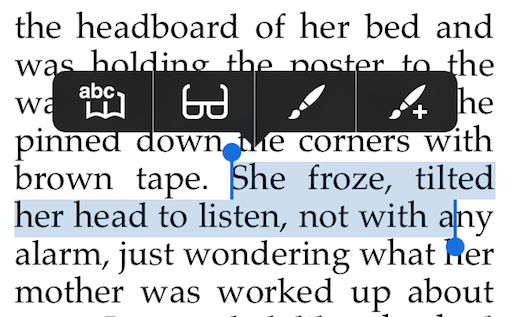
With an eBook open in Marvin, touch and hold on the text that you want to annotate. The text will be selected. You can drag and drop the sliders under the text to expand or contract your selection area. Several options will show above the selected text.

marvin2

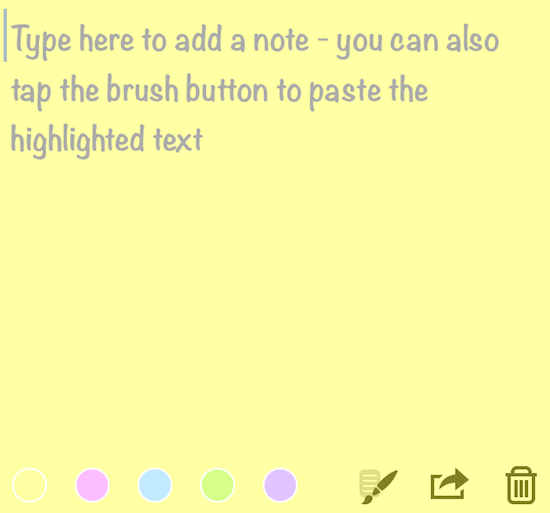
Click on the paint brush icon with the “+” to highlight the selected text and enter a note.

marvin3

Enter your note in the box and then tap away from the window to save the note into this book’s annotations.

marvin4


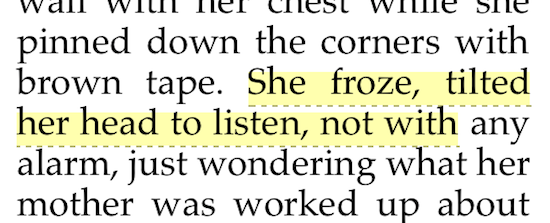
The selected text is now highlighted. You can click on the highlighted text to edit your note.

marvin5

Exporting Annotations

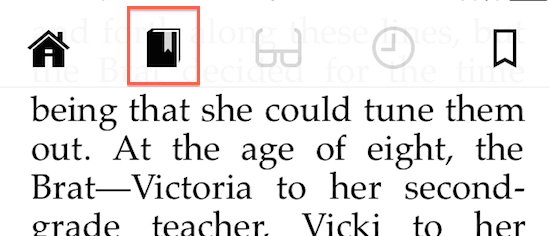
You can export an individual annotation or a list of all annotations for a book by first clicking on the book icon at the top of the Marvin app.

marvin6

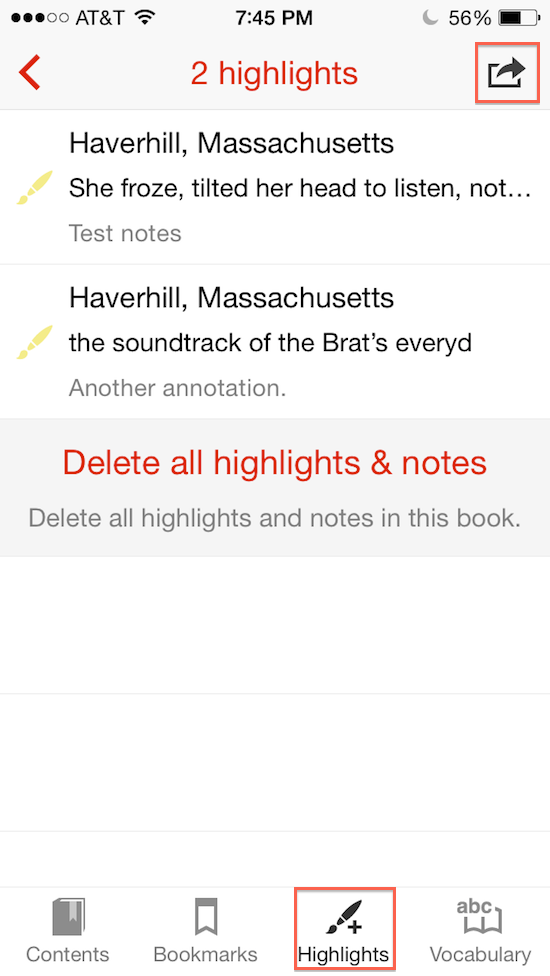
Click on the Highlights tab at the bottom to view the list of annotations for this book. Click the export icon at the top right corner to access the export options.

marvin7

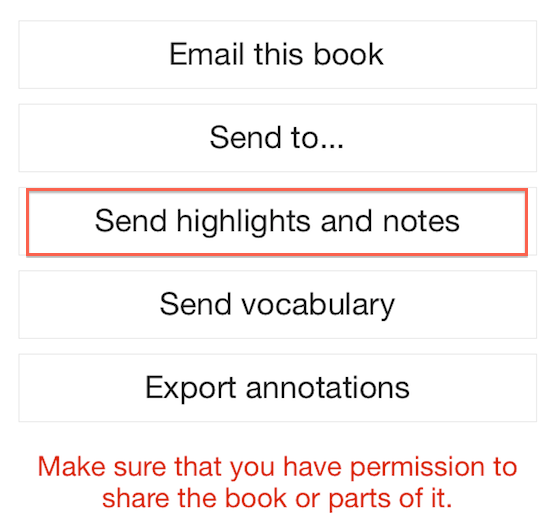
Tapping the Export Annotations option will create a .MRV file that can only be read by others that have the Marvin App (nice for backups but not a great way to send annotations to others). Instead, use the Send Highlights and Notes option to export a list of all annotations for the book.

marvin8

An email is created for you that has both a .CSV (comma separated values) that can be opened in Microsoft Excel or Apple Numbers and a .HTML file that can be opened in any browser. These formats are totally portable and easily sent to anyone that needs a list of your annotations.

marvin9

Marvin is a convenient app to create annotations on the go and easily export them in an open format.

8 Tips on Being an Effective Beta Reader

May 24, 2014 By Ben Lane Hodson in Books, Tips & Tricks, Writing

8 Tips on Being an Effective Beta Reader

Beta readers are readers that receive an early (pre-publication) copy of a book to read and provide feedback to the author. The term “beta” is taken from the software world where early versions of software (still with bugs and not feature-complete) are termed “beta” releases and are put out to receive feedback from a select group of advance users.

What Does a Beta Reader Do?

The author provides a copy of the book (usually in digital form but sometimes printed also) to the beta reader and sets a deadline for when feedback must be received. The beta reader reads the book and may make notes or annotations along the way about their reactions to the story, what they liked, what they disliked, where they got confused, and any parts that might need to be improved.

“The number one goal of a beta reader should be to provide feedback that will help make the book better.”

What Can a Beta Reader Expect?

The book beta readers are given is not a print-ready version. There will most likely be issues like grammar, punctuation, and sentence wording. Authors usually provide their book to beta readers when they feel that the major story issues are worked out and the book is getting close to being ready for publication.

Ways to be an Effective Beta Reader

Don’t focus too much on grammar, punctuation, or sentence structure. The author will most likely have professional editing services provide a final copy-edit on the book before publication. Feel free to give feedback on any obvious grammar / punctuation / sentence structure issues but try to focus most of your efforts on the story itself.

As you read, here are a tips:

1) Confusing or unclear parts – look for any passages that confused you or where you were pulled out of the story. Places that are unclear or you had to read multiple times to understand are important to note.

2) Satisfying ending – did the ending fit with the story? Was it satisfying?

3) Out of character – did a character do or say something that didn’t seem to fit the character that had been established?

4) Overused phrases – are there words that seem overused or a phrase that seemed to be improperly used?

5) Boring parts – were there any places where you were tempted to skip ahead? Any parts of the story that seemed boring?

6) Underdeveloped scenes – were there any scenes that you had trouble visualizing? Was there a part where you had trouble picturing a setting or what the characters looked like?

7) Realism – Do the characters seem real? Do their motivations make sense?

8) Plot holes – was there a part where the character should have done something obvious but didn’t and it frustrated you?

Remember that the most important thing you can do as a beta reader is to provide honest, constructive feedback that can help make the book better.

«< 32 33 34 35 36 >»

About Ben

Ben Lane HodsonWriter, comic book creator, filmmaker, musician, entrepreneur, cook, software developer, hiker, surfer, & rock climber. Ben is the author of the Blood & Glory, Shutter, 8-Bit, and Bukeey comic book series. His new book, Tales of the Macabre West was published in December 2014.

Follow Me

Latest Book


My short story Little Bundle of Death was published in this anthology. Available in both paperback and eBook.
Buy it on Amazon.com

Ben’s Instagram

Recent Posts

  • Walking with the Dead: The Cinematic History of Zombies
  • My Experience using a Pebble Watch
  • Panel Schedule for Salt Lake Comic Con 2016
  • Supergirl: The Panel
  • The Slasher Craze of the 1980’s
Ben Lane Hodson
© Ben Lane Hodson 2026
Powered by WordPress • Themify WordPress Themes

↑ Back to top